
Conversations, team takeover and handoff
Every conversation from the widget, WhatsApp, Instagram and Telegram lands in one shared inbox. The AI answers first; any teammate can take over, reply directly and hand the conversation back to the AI.
How conversations work
- Every conversation from your website widget, WhatsApp, Instagram and Telegram lands in one shared inbox: Conversations.
- The AI support agent answers first, from your Knowledge and, for signed-in widget customers, from the account data your backend authorizes.
- It replies in the customer's language.
- Your team can read along, take over, assign and reply at any time. Every plan includes unlimited teammates.
Take over and Resume AI
Any teammate can take a conversation from the AI and hand it back.
- 1Open the conversation in Conversations.
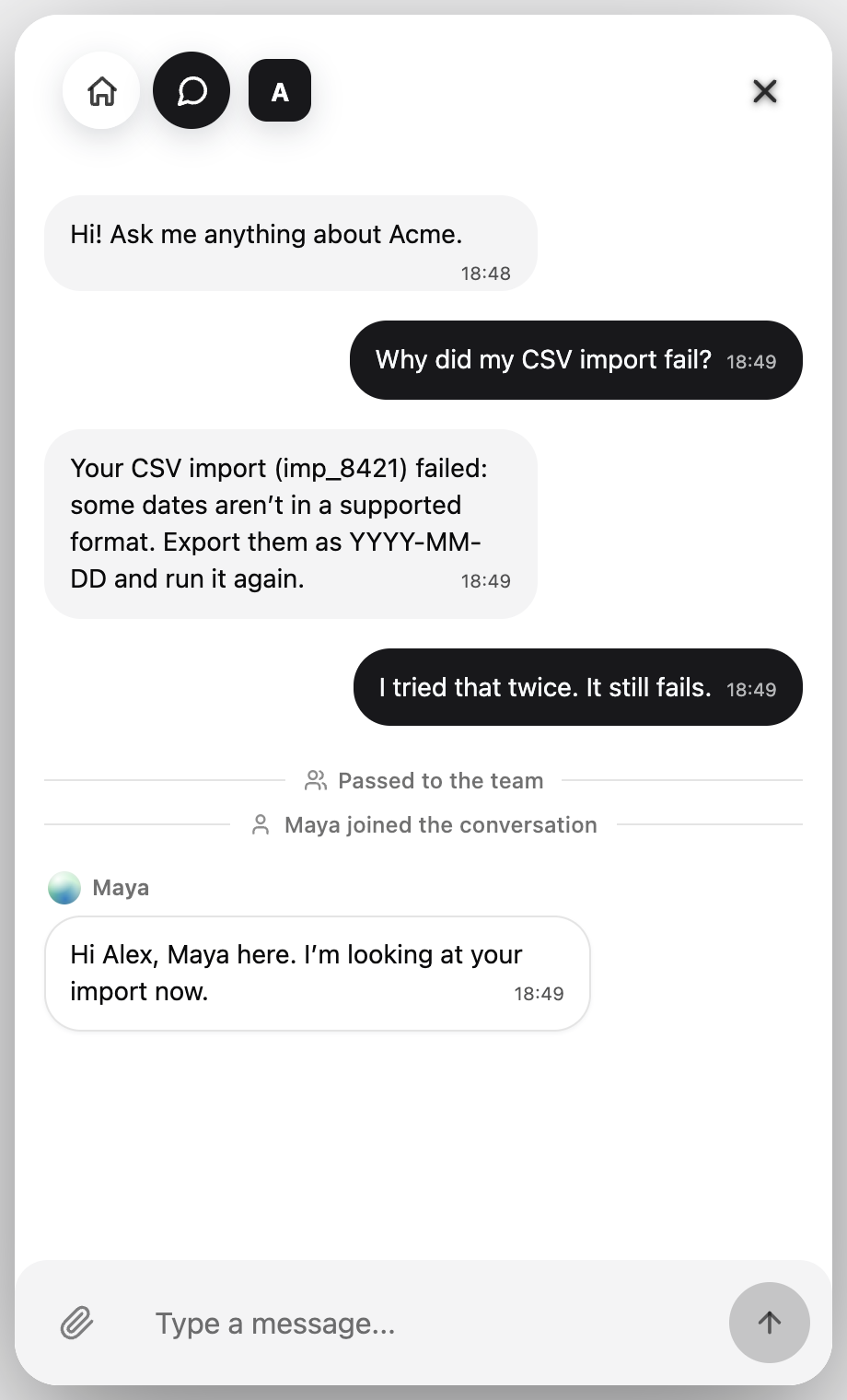
- 2Click Take over in the conversation header. You see "You took over. The AI is paused for this conversation."
- 3Reply directly. The AI stays silent while a person holds the conversation, and the inbox shows it as Human handling.
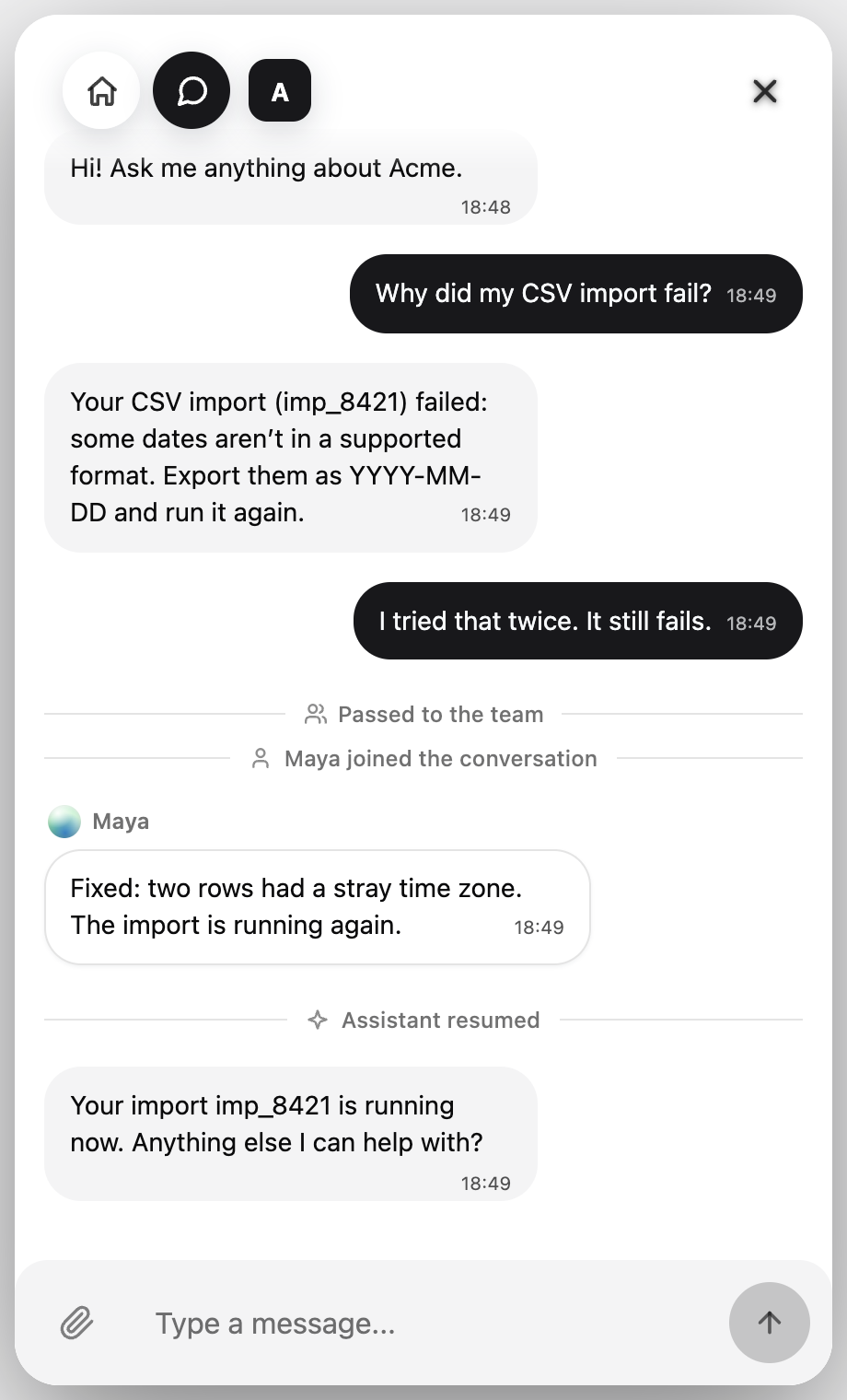
- 4In the widget, the customer sees "{name} joined the conversation" when your first reply arrives.
- 5When you are done, click Resume AI. The AI answers again, and the widget shows "Assistant resumed" when it does.
- If you start typing while the AI is on, the composer offers a shortcut: Take over to handle it yourself.
Assignment
- Assign a conversation from its header: Take it yourself, assign it to a teammate, or Unassign it.
- Filter the inbox by All, Mine or Unassigned.
- Assignment changes appear live for the whole team, and the new assignee is notified.
- Assignment is conflict-safe: if someone changed it a moment before you, you see the latest state instead of overwriting it.
When the AI hands off
- When the evidence or authority to answer is missing, or the customer asks for a person, the agent stops instead of guessing.
- It does not send a scripted "a human will reply" message.
- The conversation is marked Needs reply and Waiting on team, and your team is notified.
- A teammate takes over with the full conversation, including the customer's files and voice notes.
WhatsApp 24-hour messaging rule
- Within 24 hours after customer last message: you can reply normally from dashboard.
- Outside 24 hours: WhatsApp may restrict dashboard sending and template flow may be required.
- If needed, you can reply from WhatsApp Business app.
- Read full channel details: /docs/whatsapp-business
Voice notes, images and files
- Voice notes are transcribed and can be played back in the thread.
- Images, screenshots and documents customers send appear in the thread, and the agent reads them as context.
- Details: Voice, files and screenshots.
Sales & booking (optional module)
- Workspaces that already use Auto Sales, catalog or booking features keep them.
- They are an optional module and not part of the default AI customer support setup. See Auto Sales.
Next steps
- Connect your Knowledge sources.
- Install the website widget.
- Recognize signed-in customers.
- Invite your team. Every plan includes unlimited teammates.
Related guides
Continue with the next setup steps around channels, booking, scheduling, or automation.
Common questions
Can a teammate take over from the AI?
Yes. Open the conversation and click Take over. The AI pauses for that conversation and your teammate replies directly. Click Resume AI to hand it back.
Does the AI keep answering after a teammate joins?
No. While a person holds the conversation, the AI stays silent. It answers again only after someone clicks Resume AI.
Which channels share the inbox?
The website widget, WhatsApp, Instagram and Telegram. The same AI agent answers on all of them, and takeover works the same way everywhere.
Do teammates cost extra?
No. Every plan includes unlimited teammates.